Built My First VS Code Extension: Lightweight Markdown Preview
A Markdown preview has a narrow job: turn the active text file into readable HTML. I wanted that job to stay local and avoid analytics or remote rendering services.
I built Lightweight Markdown Preview as a small VS Code extension that renders Markdown in a webview. It includes Mermaid diagrams and MathJax equations. This post explains the data flow and the deliberate limits behind the small package.
Navigate this post
Key Capabilities and Architecture
The extension parses content locally and does not include product analytics. The design keeps its scope to previewing rather than adding authoring, publishing, or project-management features.
-
Minimal Footprint
Packaged at under 38 KB with approximately 300 lines of code to eliminate editor overhead. -
Privacy Preserving
Operates with zero telemetry, zero tracking scripts, and zero external network requests. -
Live Rendering
Updates the preview panel when the source document changes. -
Bundled Renderers
Renders Mermaid diagrams, MathJax equations, tables, and standard Markdown elements inside the webview.
To maintain a fast rendering loop, the extension processes text edits through an isolated webview panel using local JavaScript libraries. The diagram below illustrates how document content flows from the VS Code editor to the local preview display.
---
title: "Extension Data Flow and Local Rendering Architecture"
---
flowchart TB
    accTitle: Local Markdown preview rendering architecture
    accDescr: The extension sends the active document to an isolated webview, where local parsers render Markdown, math, and Mermaid diagrams.
    A["Active Markdown Document"] -->|"sends content"| B["VS Code Extension Host"]
    B -->|"dispatches message"| C["Isolated Webview Panel"]
    C -->|"parses syntax"| D["Local Markdown Parser"]
    D -->|"renders math"| E["MathJax LaTeX Engine"]
    D -->|"renders diagrams"| F["Mermaid Rendering Engine"]
    E --> G["Final HTML Preview"]
    F --> G
The rendering architecture operates entirely within local memory, ensuring that no document fragments leave your machine.
Editor Compatibility
The extension targets the VS Code extension API. Compatibility with VS Code-derived editors depends on the API version and marketplace support provided by each editor, so verify the current editor before relying on it.
Core Features
The following table records the extension's own design properties. It avoids an unsupported comparison with an undefined “typical” extension.
| Design property | Lightweight Markdown Preview |
|---|---|
| Package size at the measured release | Under 38 KB |
| Approximate source size at the measured release | 300 lines |
| Product telemetry | Not included |
| Mermaid rendering | Included |
| MathJax rendering | Included |
The small measured size follows from the narrow feature set. Package and line counts are snapshots of a release, so remeasure them before repeating the numbers for a later version.
Supported Syntax Input Example
```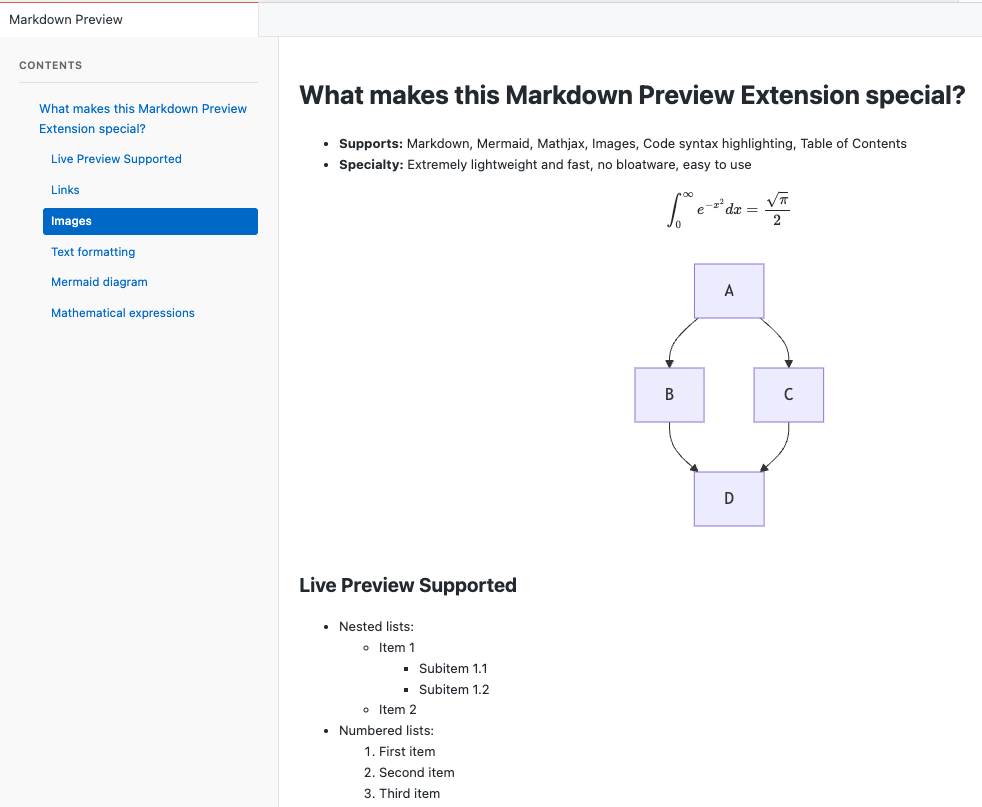
The preview pane updates as the source changes and renders elements such as flowcharts, sequence diagrams, and mathematical expressions beside the Markdown.
Installation and Setup
Lightweight Markdown Preview does not require a project configuration file. You can inspect the source on GitHub or install the packaged extension from the VS Code Marketplace.
To launch the preview pane:
- Open any Markdown file (
.md) in VS Code or a compatible editor. - Click the preview eye icon in the upper-right editor action bar.
- Edit your document with live side-by-side preview rendering.
Conclusion
Building Lightweight Markdown Preview demonstrated that editor tools do not need multi-megabyte bundles or complex dependency trees to deliver essential functionality. By keeping the codebase under 300 lines and restricting scope strictly to Markdown, Mermaid, and LaTeX rendering, the extension maintains instant load times and complete user privacy.
For writers who need this feature set, a single-purpose preview reduces the number of unrelated settings and services involved. Check compatibility separately when using an editor other than VS Code.
References and further reading
Open the complete reference catalog
Primary Sources
Related Site Guides
- VSCode Insiders Revert Guide - Field guide for managing VS Code development environments
- Markdown Presentation Tool - Lightweight slide deck generation from Markdown sources