Markdown Flashcards - A Local-First Flashcard App
Flashcards often begin as notes, but moving them into a separate app creates another copy to maintain. A database hidden behind cloud sync can also make ordinary Git history and text-based review difficult.
I built Markdown Flashcards so the deck remains a Markdown file. The local application turns that file into a study session and writes review dates and ratings back as readable metadata. This post explains the file format, review flow, and trade-offs of keeping content and study state together.
Navigate this post
Core Features
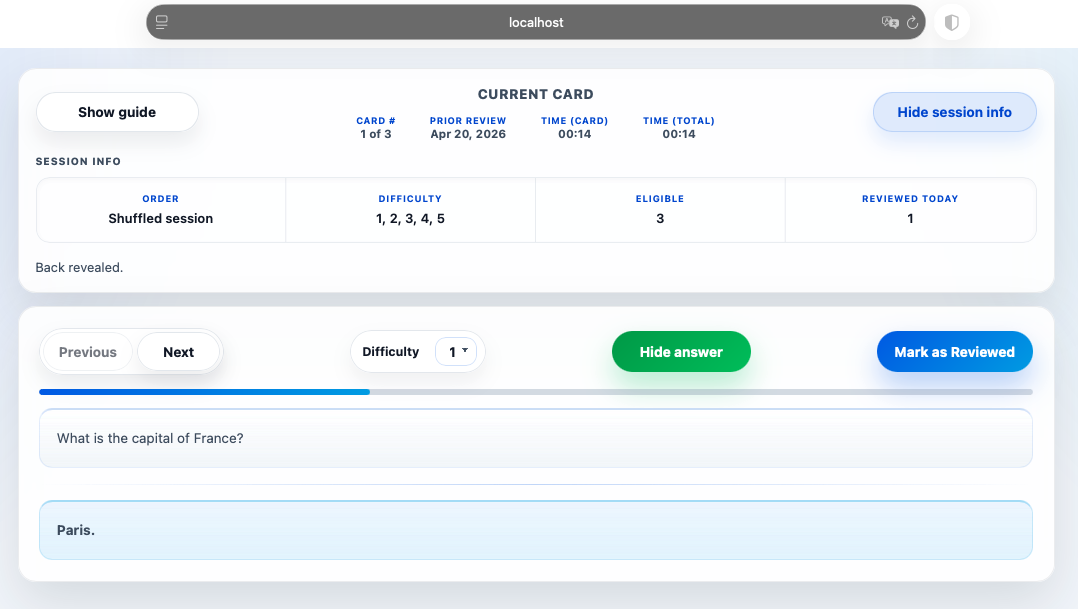
Markdown Flashcards combines plain text with spaced repetition, a review method that schedules a card again based on how well you remembered it. The application parses Markdown cards, filters a study session, and updates review statistics without an application database or network service.
-
Local-First & Private
Runs completely on your machine with zero cloud tracking, third-party analytics, or external server dependencies. -
Plain Text Source of Truth
Your entire deck lives in a singlecards.mdfile, making it straightforward to edit in any text editor and manage with Git. -
Rich Markdown Support
Build cards using syntax highlighting in code blocks, mathematical expressions, data tables, and local image assets. -
Transparent Metadata
Study statistics such as difficulty ratings and review dates are written back into the original file as clean YAML frontmatter.
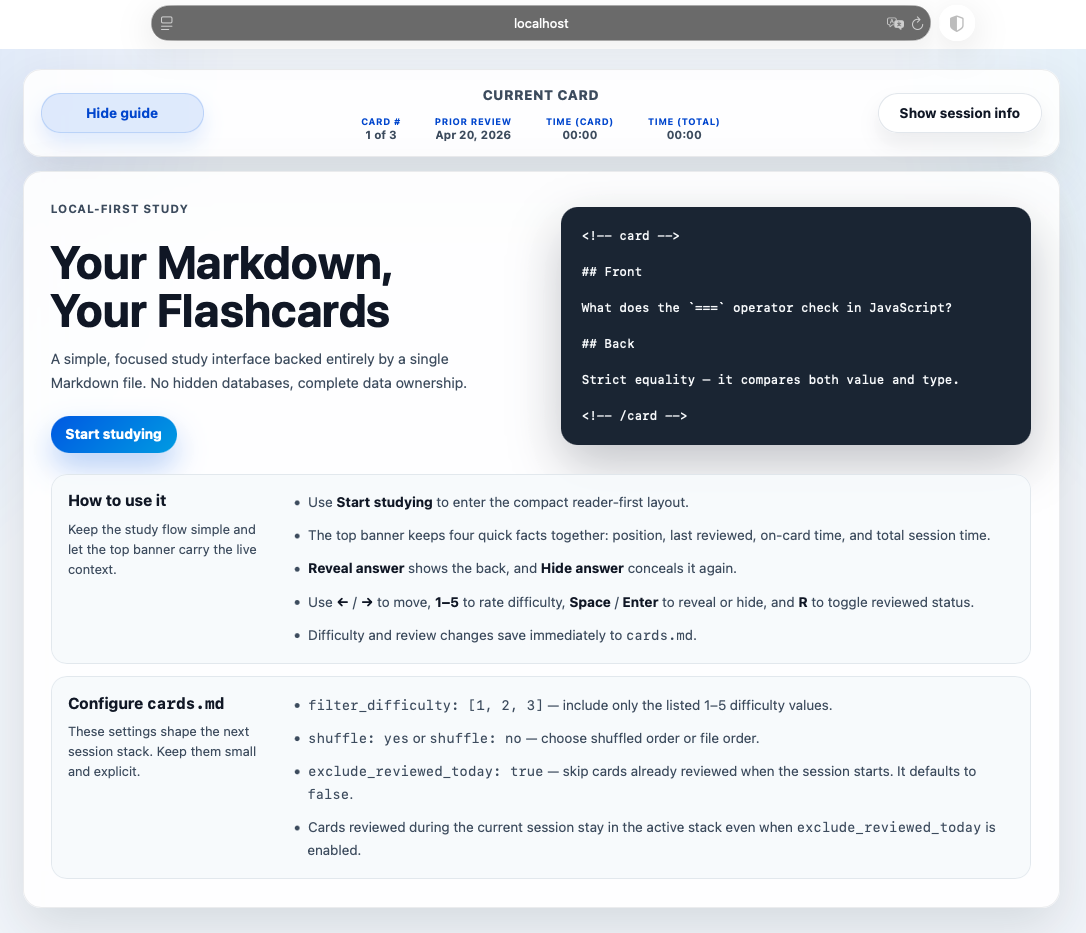
Landing Page
Study Mode
Quick Start
Getting started with Markdown Flashcards requires Node.js installed on your local environment. Follow these steps to initialize the application and open the study interface:
- Install project dependencies:
- Start the local server:
- Access the study interface in your browser:
http://localhost:54123
Writing Cards
Card decks are structured using plain text file boundaries. At a minimum, each individual card requires a front prompt and a back response wrapped inside HTML <!-- card --> comment markers.
<!-- card -->

## Front

What does the `===` operator check in JavaScript?

## Back

Strict equality - it compares both value and type.

<!-- /card -->
Card Metadata
Once you complete study sessions, the application updates review statistics automatically by prepending a YAML metadata block inside the card container:
<!-- card -->

```yaml
id: a1b2c3d4
difficulty: 3
last_reviewed: 2026-04-26
paused: no
```

## Front

...
The application automatically manages the following card properties so you do not need to edit them manually:
id- stable card identifier generated during initial parsingdifficulty- current rating on a scale from 1 to 5last_reviewed- ISO timestamp (YYYY-MM-DD) recording the latest study datepaused- set toyesto temporarily remove a card from active sessions without deleting it
---
title: "Markdown Flashcards Data Flow"
---
flowchart TB
    accTitle: Markdown Flashcards data flow
    accDescr: A local server reads cards and review metadata from Markdown, serves the browser interface, and writes new ratings back to the same file.
    A["cards.md (Plain Text Deck)"] -->|"Parses Cards & Metadata"| B["Node.js Server Process"]
    B -->|"Renders Card UI"| C["Browser Interface (Localhost)"]
    C -->|"Submits Ratings & Reviews"| B
    B -->|"Writes Updated YAML"| A
The application reads card syntax directly from disk, passes active cards to the browser UI, and saves updated review timestamps back to cards.md.
Why Plain Text Metadata Storage Matters
Storing study metadata directly inside standard Markdown files eliminates proprietary database files. This means your learning history remains human-readable, fully searchable using standard CLI tools like grep, and easy to back up using standard Git commits.
Configuration Parameters
The YAML frontmatter block located at the very top of cards.md determines how the study deck is filtered and ordered during a review session. These parameters are parsed when the application server starts.
The following table summarizes available session parameters:
| Configuration Field | Data Type | Default Value | Parameter Description |
|---|---|---|---|
filter_difficulty |
List of Integers | [1, 2, 3] |
Restricts study sessions to specific card difficulty ratings (scale 1-5). |
shuffle |
Boolean | yes |
Controls whether card presentation order is randomized. |
exclude_reviewed_today |
Boolean | false |
Filters out cards already marked as reviewed on the current date upon startup. |
Filter settings control initial deck construction during server initialization. For instance, setting filter_difficulty to [1, 2, 3] ensures high-mastery cards (ratings 4 and 5) are excluded from the active deck, allowing focus on challenging material.
Server Startup Requirement
Configuration parameters are read once during server initialization. If you modify settings in cards.md, you must restart the Node.js server process and refresh your browser tab for changes to take effect. Note that exclude_reviewed_today operates as a startup filter; cards reviewed during an active session remain in the current session queue until finished.
Development and Project Structure
The project repository follows a modular layout separating browser UI components from Node.js file parser logic:
public/- Browser UI assets including HTML, CSS, and client JavaScript frontend codesrc/- Node.js parser modules, file watcher setup, and study session logictest/- Automated test suite and markdown deck test fixturesassets/- Local images and static assets referenced within cardslogs/- Application execution logs created during local sessions.bak/- Automated timestamped backups ofcards.mdgenerated prior to writing metadata updates
Helpful Commands
Development and test execution rely on standard npm scripts:
npm run dev- launches the application with live watch mode enablednpm test- executes the automated test suite
Contract Verification
Before contributing or modifying parser logic, review spec.md in the project root to ensure changes preserve the file-format contract and backup mechanisms.
Conclusion
Markdown Flashcards offers a lightweight, privacy-focused alternative to cloud-based revision software. By maintaining deck contents and review metadata within plain text files, the application gives you total data ownership while preserving full compatibility with standard text editors and version control workflows.
Whether you are preparing for technical interviews, studying software documentation, or building vocabulary decks, keeping cards in plain Markdown ensures your learning resources remain accessible, durable, and free from platform lock-in.
References and further reading
Open the complete reference catalog
Primary Sources
Related Site Guides
- Lightweight Markdown Preview - Fast local Markdown preview tool for editors