TimeTrackly - Private, Local-First Time Tracker
Time logs can contain client names, project details, and working patterns. A cloud-based tracker stores some of that information on someone else's infrastructure and may require an account or network connection.
I built TimeTrackly as a local-first alternative for developers, freelancers, and makers. It stores time entries as JSON files on the user's machine and works without a cloud service. This post explains that storage model, its privacy benefits, and the backup responsibility that comes with it.
Navigate this post
The Problem with Cloud-Based Time Trackers
Many productivity tools are delivered as software as a service (SaaS). Cloud synchronization is useful across devices, but it also moves storage and availability outside the user's direct control.
Requirements vary by product: some trackers require accounts, store task metadata remotely, or send product analytics. A local tool avoids those transfers by default, but it does not provide automatic multi-device sync or managed backups.
| Design question | Cloud service | TimeTrackly |
|---|---|---|
| Account required | Depends on product; commonly yes | No |
| Primary data location | Provider-managed storage | Local JSON files |
| Offline use | Depends on product | Supported |
| Multi-device sync | Commonly included | Not built in |
| Backup responsibility | Shared with provider | Belongs to the user |
The choice is a trade-off rather than a universal ranking. TimeTrackly keeps the primary log local and avoids an application cloud service, while the user must arrange backups and any cross-device workflow.
Local-First Architecture and Privacy Pillars
TimeTrackly follows local-first software principles. Instead of transmitting data across the internet, the application operates entirely within your local execution environment.
All timer state and task logs reside on disk as standard JSON files. This ensures that you retain full ownership over your data and can view, back up, or process logs with standard command-line tools.
-
Local Data Storage
Time entries are stored on local disk in plain JSON instead of an application cloud account. -
No Account Setup
The application does not require an account or cloud credentials before recording a session. -
Offline Operation
Core time tracking continues without an active internet connection. -
Readable Storage
JSON files can be inspected, copied, or processed with common tools.
Plain JSON Data Format
TimeTrackly stores session logs directly on disk inside human-readable JSON files. You can inspect, back up, or transform your data using standard shell scripts without needing proprietary export tools.
Ideal Use Cases for Developers and Freelancers
Local-first time tracking provides concrete advantages across several common workflow scenarios:
- Independent Freelancers: Track billable project hours without uploading client names or project details to external database servers.
- Privacy-Conscious Teams: Each team member runs an isolated local instance, allowing individuals to maintain total control over their personal productivity patterns.
- Makers and Open-Source Developers: Prefer minimal dependencies and toolchains that run reliably without background update prompts or account notifications.
Installation and Setup Guide
Setting up TimeTrackly takes less than a minute. The application runs locally using Node.js without requiring third-party library installations.
To run TimeTrackly locally, clone the repository and launch the application:
git clone https://github.com/kanad13/time-tracker.git
cd time-tracker
npm start
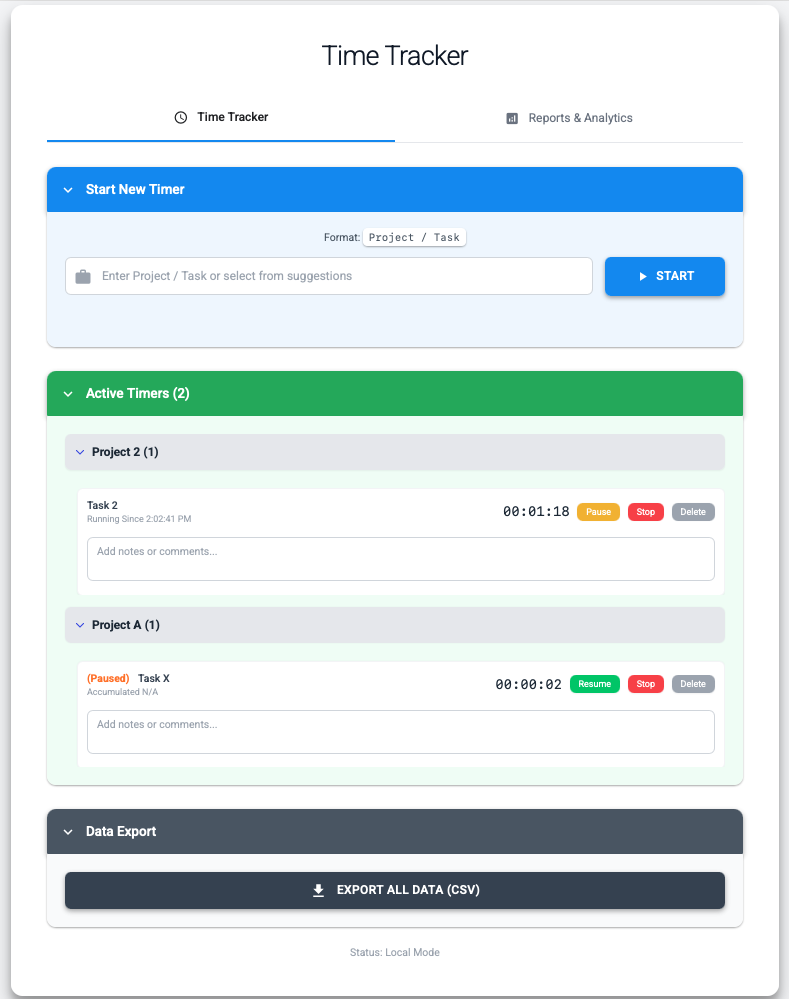
After executing npm start, open your web browser and navigate to http://localhost:13331 to access the interface. All data will save directly to your local file system. Source code and documentation are available in the TimeTrackly GitHub Repository.
Conclusion
TimeTrackly provides a simple, privacy-respecting alternative to cloud-heavy time tracking applications. By keeping all data stored locally in standard JSON files and eliminating external network dependencies, makers and freelancers retain full control over their productivity data.
Local storage reduces third-party data sharing, but privacy still depends on operating-system security, backups, and who can access the machine. That boundary should be explicit when choosing a tracker.
References and further reading
Open the complete reference catalog
Primary Sources
Related Site Guides
- Lightweight Markdown Previewer - Local-first developer tools guide